Sunday, June 29, 2008
Field Day 2008
This year saw 15 meters open up and even 10 meters for some periods of time.
Many special event stations were noticed on the bands.
The KY Indiana DX Association consisting of K4SAC, AA4RL, KJ4EVH, and KY4COE operated FD from EM67.
We made just a shade over 1020 Qso's, over 90% on CW.
We had a great time and look forward to next year's run!
73, Jack K4SAC
Thursday, June 26, 2008
Firefox phones home.......
I was disturbed to learn that Firefox makes unrequested connections....I thought those of you that read this blog may want to know....Click on my title to go to the original article. 73, Jack K4SAC
Firefox makes unrequested connections
- Loopback connection
- Live Bookmarks updating
- Auto-update checking
- Home page loading
- Anti-phishing list updating
- Anti-malware list updating
- Link prefetching
- Extension blocklist updating
- Live Title updating
- Extensions
- Downloads restarted
- Infected with malware
Loopback connection
A loopback connection (to IP address 127.0.0.1) can be made by Firefox on non-Unix machines. In this case the browser is communicating with itself as expected, and it is not recommended that this communication be blocked. See bug 100154 for more information.
Live Bookmarks updating
Live Bookmarks automatically reload themselves on a regular basis, and in doing so will make a connection to the internet. Deleting all your Live Bookmarks will stop these connections from being made.
Auto-update checking
Firefox occasionally checks to see if any updates are available for itself, for your add-ons (extensions, themes, etc), and for your search engines. To disable these checks:
- At the top of the Firefox windowOn the menu bar, click on the ToolsFirefoxEdit menu, and select Options...Preferences....
- Select the Advanced icon.
- Select the Update tab.
- Uncheck Firefox, Installed Add-ons, and Search Engines.
Home page loading
Your home page may be loading. To change your home page to something that doesn't generate connections to the internet:
- At the top of the Firefox windowOn the menu bar, click on the ToolsFirefoxEdit menu, and select Options...Preferences....
- Select the Main icon.
- Set When Firefox starts to Show a blank page.
Anti-phishing list updating
The phishing protection list may be updating itself. To turn this off:
- At the top of the Firefox windowOn the menu bar, click on the ToolsFirefoxEdit menu, and select Options...Preferences....
- Select the Security icon.
- Uncheck Tell me if the site I'm visiting is a suspected forgery.
Anti-malware list updating
The malware protection list may be updating itself. To turn this off:
- At the top of the Firefox windowOn the menu bar, click on the ToolsFirefoxEdit menu, and select Options...Preferences....
- Select the Security icon.
- Uncheck Tell me if the site I'm visiting is a suspected attack site.
Link prefetching
Firefox will prefetch certain links if any of the web sites you are viewing uses the special prefetch-link tag. For more information, please see the Link Prefetching FAQ. To disable prefetching:
- In the Location bar, type about:config, and press EnterReturn.
- The about:config "This might void your warranty!" warning page may appear. Click I'll be careful, I promise!, to continue to the about:config page.
- In the about:config page, search for the preference network.prefetch-next.
- Observe the Value column of the network.prefetch-next row.
- If it is set to false then do nothing.
- If it is set to true, double-click on it to set it to false.
Extension blocklist updating
Firefox may be updating its extension blocklist. To disable this:
- In the Location bar, type about:config, and press EnterReturn.
- The about:config "This might void your warranty!" warning page may appear. Click I'll be careful, I promise!, to continue to the about:config page.
- In the about:config page, search for the preference extensions.blocklist.enabled.
- Observe the Value column of the extensions.blocklist.enabled row.
- If it is set to false then do nothing.
- If it is set to true, double-click on it to set it to false.
Live Title updating
If you have any Live Title bookmarks, they may be updating themselves. Deleting all your Live Title bookmarks will stop these connections from being made. For more information, please see the Microsummaries wiki page.
Extensions
An extension you have installed may be making a connection to a web site that it relies on. For example, a connection to a web site to synchronize your bookmarks, a connection to a web site to update a list of sites to block, etc. Or it is possible an extension could be changing the expected behavior of Firefox in other ways. For example, FasterFox extension has an option to prefetch all links.
To easily disable all of your extensions please read the Safe Mode article, paying particular attention to the Disable all add-ons option under the Make Changes and Restart section.
Downloads restarted
When you start Firefox, any interrupted downloads from your previous browsing session may be automatically resumed.
- From the menu bar at the top of the Firefox window, select the Tools menu and then select the Downloads menu item.
- Ensure nothing is currently being downloaded
Infected with malware
If your machine is infected with a virus, trojan, or spyware, then Firefox's internet connection may be being piggybacked in order for the malware to communicate with its author or to deliver adverts onto your machine, etc. If you suspect this is the case, consider seeking specialized advice from one of these malware support sites:
Please be aware that Mozilla is not responsible for the content of third-party web sites.
Credit: http://support.mozilla.com/fr/kb/Firefox+makes+unrequested+connections
Technology Tip
If you need to share files between computers and have an internet connection at each computer, Microsoft has come out with a free(for now) service. That you can hold up to 5 GB online.
You have to have a Microsoft Live ID (which I think hotmail accounts work for that)
below is the blurb from Microsoft about this new service...
http://skydrive.live.com/welcomemoreinfo.aspx
· 5 GB of free online storage, available from any computer with Internet access.
· Create personal, shared, and public folders -- you decide who has access to each folder.
· Windows Live SkyDrive works well on any Windows or Macintosh computer with Firefox 1.5 or higher, or Internet Explorer 6 or higher.
How we help protect your files
· Your personal folders are password-protected with your Windows Live ID, so only you have access.
· When you create a shared folder, the friends you're sharing with need to sign in with their own Windows Live ID and password.
· Just like at your online bank, all file transfers are protected using Secure Socket Layers (SSL).
Personal
· Use personal folders to back up important files that are only for you.
· Get to your files from any computer with Internet access by signing in with your Windows Live ID.
Shared
· Shared folders make it easy to collaborate with coworkers or classmates.
· You decide how much control each person has over each shared folder. Some can just read what's there: others can add and delete files.
· Everyone who is sharing uses their own Windows Live ID.
Public
· With public folders, anyone on the Internet can view your files, but they can't change them.
· Want to show your public files to others? Just send them a link! Each folder and file has its own web address.
Tuesday, June 24, 2008
New Worked All KY Counties Award
The rules are:
Requirements:
Contact and confirm with each of the 120 counties of Kentucky
Any Band
Any Mode
No date restrictions
SWL's may also apply
No Endorsements are available
Applicants must use The Bluegrass Chapter 214 application form and county list.
Both are available for downloading from the Bluegrass Chapter 214 offical website
www.qcwa214.org or by sending an SASE to the award manager.
If you are a current holder of a USA-CA 3077 all is required is an filled out application and fee.
Upon completion submit a filled out county list and application with a fee of $7.00.
The award manager reserves the right to request contact confirmation to check for validity.
Mail application and completed counties list to the Worked All Kentucky Award manager:
Dave Vest, K8DV
2934 Rontina Drive
Goshen, Ohio 45122
USA
Questions may be directed via e-mail to KY-Award@qcwa214.org or via a SASE to the award manager.
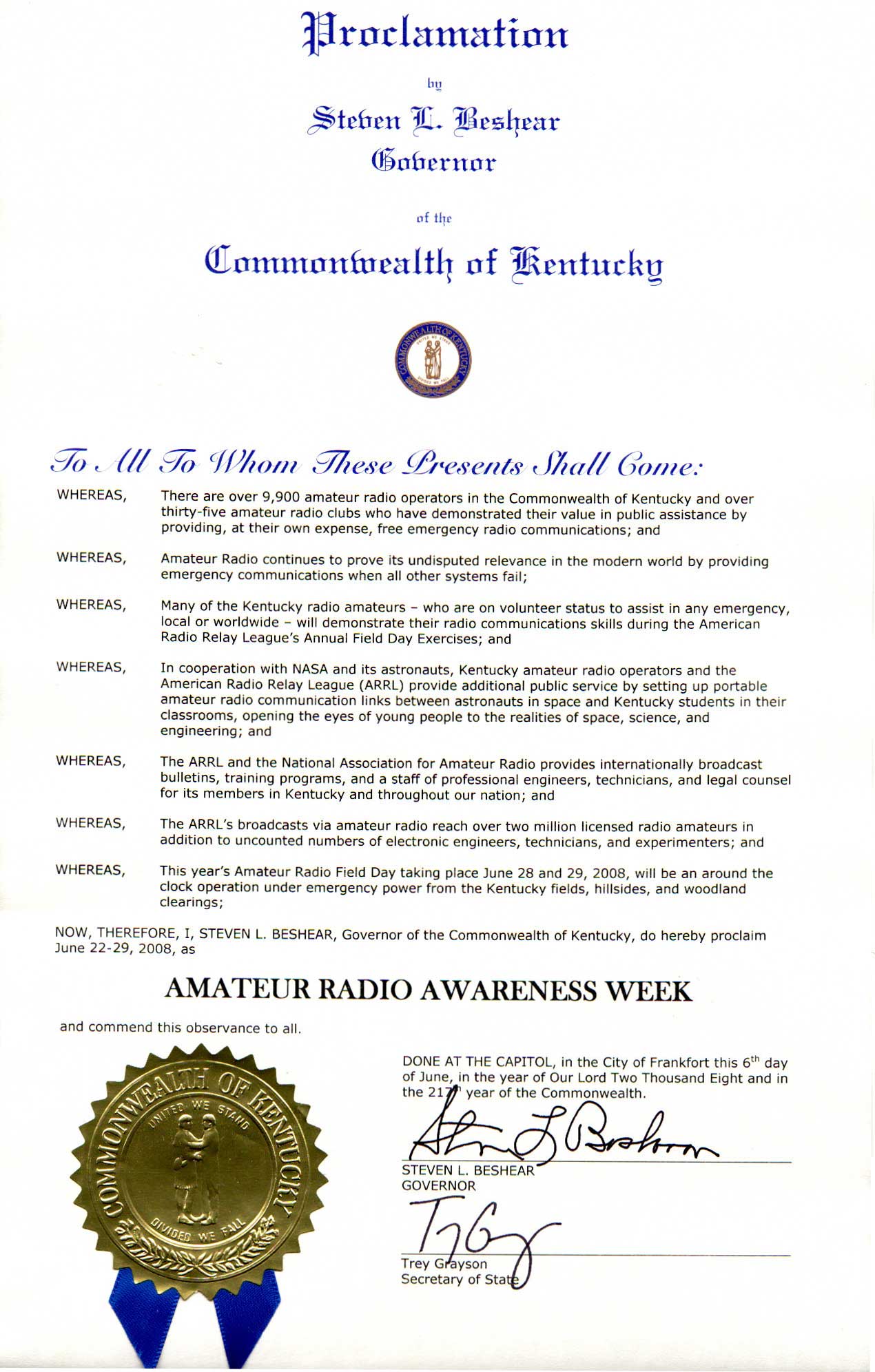
Amateur Radio Week in KY
A copy of the proclamation can be found at this link here
Friday, June 20, 2008
CQD or SOS????
The BBC recently published an article outlining the history of CQ, CQD, and SOS.
In the early days of radio there was no voice communication. It was all morse code.
Before radio, ships in distress could only signal other ships in range using lights, flags or flares.
But before SOS the was a distress signal called CQD.
CQ was a general call to demand attention from all stations, preceding a time signal or other announcement. The Marconi company, the dominant power in early radio, suggested this signal be appended with a D to work as a distress signal.
Many people thought CQD meant 'Come Quick Danger' but in reality it did not mean anything except a distress call.
The year 1906 brought a wireless telegraphy conference in Berlin, and there was a pressure to agree on a common signal.
The Italians uses SSSDDD, the Germans used SOE, and everyone used CQD.
The conference decided to use SOS and set the effective date as July 1st, 1908.
Many mistakenly believed it stood for Save Our Souls, or Sinking Of Ship, or Send Out Succour or Save Our Ship.
The first ship believed to have sent an SOS was the American steamer Arapahoe in 1909.
When the Titanic was sinking in 1912, its operator first sent out CQD and then SOS, alternating.
So that is the story of the morse distress signal.
73, Jack K4SAC
Credit: BBC NEWS UK
Thursday, June 19, 2008
Sunspots
The solar cycle tends to run in 11 year cycles, where the maximum activity occurs in the middle of the sunspot cycle and the minimum occurs at the bottom of the 11 yr cycle as it transitions from one cycle to the next.
Unfortunately, there is not usually a sharp transition, the bottom may hang around for 2 years or more.
Solar activity is defined as sunspots, solar flares, or even solar eruptions(eruptions of gas from the Sun.)
The last cycle reached its peak in 2001 and is currently at the end of its cycle transitioning into the new cycle.
What has scientists that track solar cycles concerned is that this minimum has produced no solar activity at all. While some inactivity is normal, this period of inactivity has stretched longer than normal.
In the past there have been some extended periods of inactivity. There was a period in the past where the sun did not produce sunspots for 50 years, from 1650 to 1700.
This affect ham radio operators, because during the sunspot minima low bands such as 160, 80 and 40 become the workhorse bands because the propagation does not get up to the 20-10 bands as easily.
Some links that talk about propagation:
N0HR's propagation page
N3KL's propagation page
Solar Cycle 24 Page (Excellent site)
WM7D Solar Page
N6RT's Propagation page
And a link to propagation software
So those spots on the sun do affect us more than you know!
Credit: http://www.sciencedaily.com/releases/2008/06/080609124551.htm
73, Jack K4SAC